How to Automate Email Sorting and Create Reply Drafts with AI | Build in Human Review
To reduce the workload of handling email, start by treating sorting and drafting replies as separate tasks. Test sorting with fixed conditions such as the sender or subject line, and consider AI only for the parts that require reading and interpreting the message body. For replies, begin with a process in which a staff member reviews the draft and its supporting sources, rather than sending messages automatically from the outset.
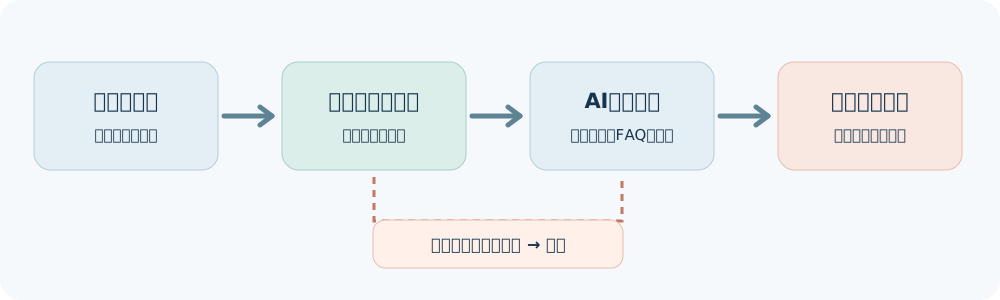
The diagram is an example of an operational design. Messages that cannot be classified, or whose attachments cannot be checked, are returned to the staff member responsible.
First, Divide Incoming Email into Three Types
Review past emails and separate those that need a reply, those that only need to be forwarded to the department responsible, and those that do not need a reply. For example, generating reply drafts for internal notifications or automatically distributed emails will not reduce the workload. Start by testing within a scope where responsibilities and permissions are clear, such as a single shared mailbox.
| Type | Example classification criteria | Next step |
|---|---|---|
| Routine questions | The service concerned and the question are clear | Find the relevant maintained FAQ and create a reply draft |
| Requires case-by-case judgment | Contracts, billing, refunds, complaints, and similar matters | Summarize the key points and pass them to the staff member responsible |
| No reply needed or unable to classify | Automated notifications, spam, or insufficient information | Do not reply automatically; place the message in the designated holding location |
The table above is a fictional design example. Choose the actual category names and forwarding destinations to fit your current operations.
Start with Sorting That Rules Can Handle
If messages can be classified by sender, recipient, fixed terms in the subject line, or the type of submission form, you can first try your email application's rules or your existing system's settings. Consider using AI to suggest classifications only when classification requires interpreting the meaning of the message body.
Define exceptions in advance as well. Do not rely solely on the classification result when messages from the same sender cover multiple matters, the subject and body differ, important information is in an attachment, or messages have been forwarded repeatedly. Make sure a staff member can return a misclassified message to the original inbox when one is found.
What to Provide When Asking AI to Draft Replies
Provide AI with the body of the email in question, the latest FAQ it is allowed to reference, and the required reply format. When handling personal or contract information, check your company's usage rules and the service's permission settings, and use only the information needed. If the reference materials do not contain the answer, mark the message as "awaiting confirmation" instead of generating a plausible-sounding response.
Please draft a reply to the following inquiry using only the provided FAQ as your source.
List the relevant FAQ passages and any matters requiring confirmation separately.
Do not fill in contract terms, prices, or delivery dates based on assumptions.
If there is no supporting source, do not finalize the reply; instead, list the questions that need to be checked with the staff member responsible.
Do not send the email.
Include the recipient, a summary of the inquiry, the FAQ used as a source, and any unconfirmed points with the draft. Before sending, the staff member opens the original email and the FAQ to check the recipient, proper names, and wording that would constitute a commitment. Broader inquiry-handling operations are covered in a phased approach to introducing AI for customer inquiries.
What to Record During the Trial
In the first few test cases, include messages that can be classified correctly, as well as messages with multiple matters, messages that need no reply, messages with attachments, and messages whose answers are not in the reference materials. Even if drafts are created quickly, the workload will not decrease if reviewing and correcting them takes time.
| Item to record | Reason for checking |
|---|---|
| Classification errors and number of messages on hold | Check whether important messages are being routed to the wrong staff member |
| Corrections to drafts | Check for problems with supporting sources, recipients, or wording that makes commitments |
| Time spent | Compare the total time, including sorting, review, corrections, and sending |
| Follow-up inquiries | Check whether incorrect guidance is increasing back-and-forth exchanges |
Download the email workflow design sheet (CSV) and fill in the classification criteria, holding location, reference materials, and reviewer for a single mailbox. The sample entries in the sheet are fictional.
Discuss Training and Grokbot Support
If you are a CEO who wants to use your own company's email to test how much to delegate to AI, see AI training content for CEOs. If you are considering ongoing operations that connect multiple mailboxes, FAQs, and internal tools, review the permission and approval requirements in the steps for implementing Grok Bot in a business. Prompts for making requests to Grok Bot are collected in the Grok Bot prompt library.
When requesting a consultation, share the mailbox in scope, frequently asked questions, materials that may be referenced, and the person responsible for checking messages before sending. This makes it easier to define the scope of the trial.